


 Previous
Paper that has a horizontal length of 139.0–600.0 mm (5.48–23.62 inches) and a vertical length of 90.0–216.0 mm (3.55–8.50 inches) can be fed in from the bypass tray.
 Load the paper face down in the bypass tray.
The bypass tray ( ) is automatically selected.
 Press the [
 ] key.
 Press [Paper Size].
 Press [Custom Size].
 Enter the horizontal size with the number keys, and then press [].
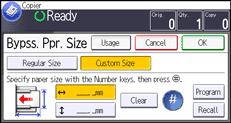
 Enter the vertical size with the number keys, and then press [].
 Press [OK] twice.
 Place the originals, and then press the [Start] key.

You can register a custom paper size. For details, see Registering a custom size
 . You can also recall the registered custom paper size. For details, see Recalling the registered custom size.


