


 Previous
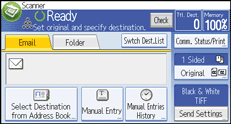
 Press [Manual Entry].
 Press [Enter] under [Destination].
 Enter the e-mail address.
 Press [OK].
To enter more than one e-mail address, press [Add Destination], and enter another e-mail address.

Depending on the security settings, [Manual Entry] may not be displayed.
The e-mail address that is entered directly can be registered in the machine's address book. For details, see Registering a destination in the address book manually
 .
.To change the entered destination address, press [Edit] on the right of the destination list.


